
Set homework
Give homework to a class, follow what is due, and mark it finished, so parents see what their child must do.
Homework is where you set homework for your classes. Parents see it in the parent portal, so they know what their child has to do and when it is due.
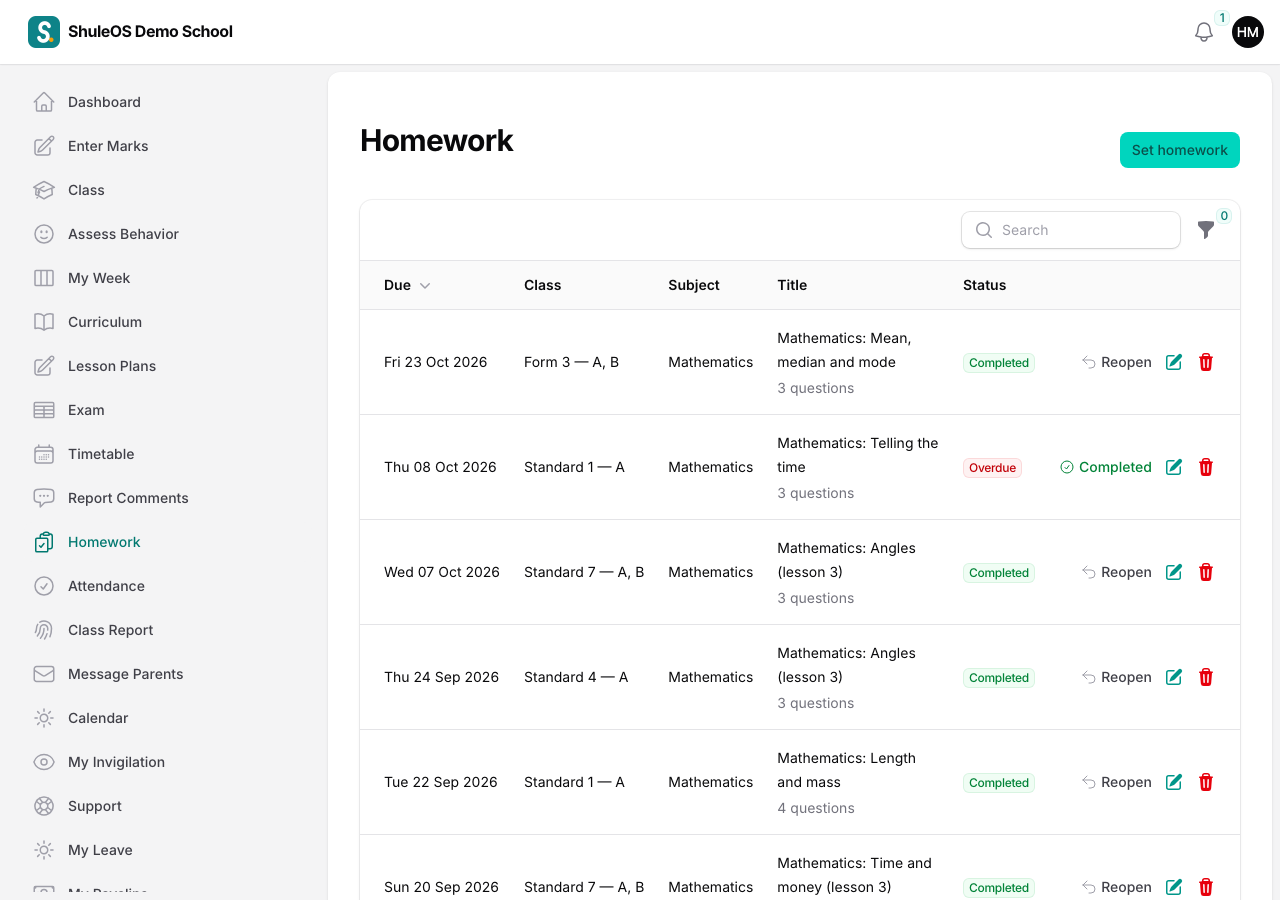
The list shows your homework with the Due date, Class, Subject, Title (with the number of questions), and Status. Filter by Status (Not completed, Overdue or Completed) and Class.
Set homework
-
Click Set homework.

-
Fill in the window:
| Field | What to enter |
|---|---|
| Class, Subject | Required. Only what you teach is listed. |
| Sections | Leave empty when it is for the whole class. |
| Title | Required. For example "Fractions worksheet". |
| What learners must do | The instructions. |
| Number of questions | Optional. |
| Given on | The day you set it. |
| Due on | Required. It cannot be before the day it is given. |
- Click Create. Use Create & create another to set the same for another class quickly.
Follow it up
- Completed: when the class has handed it in and you have dealt with it, click Completed on the row. You see "Homework marked completed — parents no longer see it as to do".
- Reopen: brings a completed homework back, if you marked it by mistake.
- Use Edit to change it, and Delete to remove it.
Homework past its due date and not marked completed is Overdue. It shows on your dashboard, in For you today, so that it is not forgotten.
Tell the parents
Parents see new homework in the portal. If your school has switched on the "Homework set" notification, they are also told by SMS, email or the bell when you set it (see the School Admin manual, "Messaging settings"). You can also send your own message: see Message the parents of your class.
If something goes wrong
| What you see | What it means and what to do |
|---|---|
| Homework is missing | The school has switched it off for teachers. |
| "The due date cannot be before the day it is given." | Choose a due date on or after the given date. |
| A class is missing | It is not assigned to you. |
| Parents say they cannot see it | The school may have switched off homework in the parent portal, or the parent is not linked to the child. Tell the office. |
Related guides
- My week and lesson plansSee your week's lessons, plan each lesson from the week view, record what you taught, and copy a plan to another day.
- Message the parents of your classSend a message to all the parents of your class, or to the parents of children you choose, by SMS, email or the portal bell, now or later.